
Guide · Article 09
Managing conversation context
The longer a conversation, the more information the AI has to process in each turn.
See how much information the AI is processing
The longer a conversation, the more information the AI has to process in each turn.
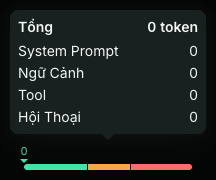
F68 shows a token meter right on each conversation, so users can see how large the current context is and take control before it becomes too heavy.
Three recommended zones
Green — 0 to 150,000 tokens
Context is within F68’s recommended range.
Yellow — 150,000 to 250,000 tokens
Context is already large. Check it and remove content that is no longer needed.
Red — over 250,000 tokens
Context is very large. Consider compressing it, removing some data, or branching the conversation.
These are F68’s recommended usage thresholds, not the model’s hard context limit.
What makes up the total conversation context?
Click the token meter to see the contribution of each component to the total context:
System Prompt · Context · Tool · History
System Prompt
The principles and instructions that shape how the AI works.
Context
Documents, knowledge base, files and information provided so the AI understands the job.
Tool
Data brought into the conversation from the tools that were used.
History
The content exchanged and accumulated during the conversation.
This way, users know not only how large the total context is, but also which part is taking up the space.
Open the context control tools
- Below the chat box, click Features.
- The menu shows these actions:
- Attach;
- Compress conversation;
- Clear context;
- Clear tool data;
- Branch chat.
- Choose the action that matches the part of the context you want to handle.
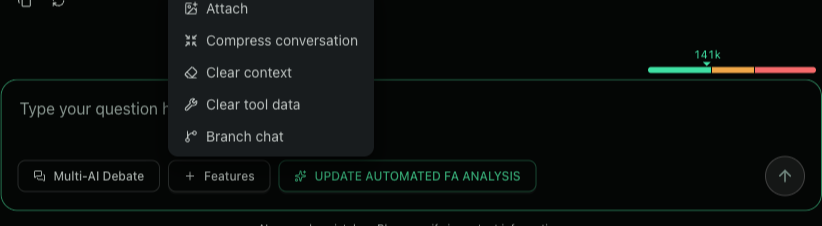
4 context control tools
1. Compress conversation
Summarizes the history already exchanged, keeping the important content while reducing the tokens that have to be carried along.
2. Clear context
Removes files, documents or context that were put into the conversation when they are no longer needed.
3. Clear tool data
Removes data produced by the tools that were called when that data is no longer needed for the next steps.
4. Branch chat
Creates a new conversation from a chosen point in the current chat. The new branch continues from the context at that moment, while the original conversation is kept intact.
Context affects both quality and cost
A larger context means more information to process on each turn. It can increase token usage and cost while keeping irrelevant material in the conversation.
Controlling context helps the AI stay more focused and gives users more control over the Credit they are using.
Choose the AI that does the work. Control the information it works with.