
Guide · Article 05
Working with AI Agents
Personal agents and specialized agents, when to use them and how to set them up.
An AI Agent is not a new model.
It is a model configured to follow a predefined workflow.
What you configure
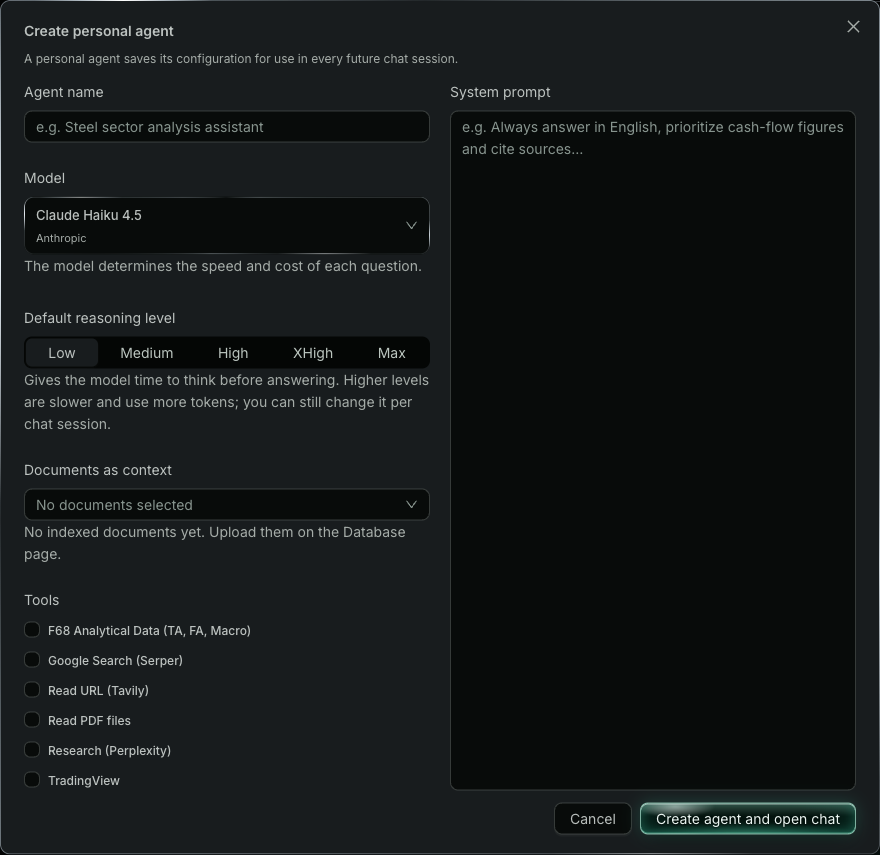
On F68 AI, the three main components users set up for an Agent are:
System Prompt
Defines how the AI must work:
- task;
- scope;
- principles;
- mandatory steps;
- stopping conditions;
- output format.
Context
What the AI needs to know to do the work:
- documents;
- knowledge;
- background data;
- methods;
- standards;
- examples.
Tools
Capabilities the AI can use when needed:
- search;
- read web pages and files;
- fetch data;
- calculate;
- connect to services.
Not every agent needs tools.
Create a personal AI Agent
- Switch to AI Agent mode.
- Choose Create new agent.
- Enter the Agent name.
- Choose the Model and the Default reasoning level.
- Choose documents in Documents as context if the work needs them.
- Turn on the Tools the Agent is allowed to use.
- Write the System Prompt describing the task, principles and how the Agent must work.
- Click Create agent and open chat.
The operating layer behind the scenes
F68 AI runs the layers needed for an agent to work with the model, context and tools in the same environment.
Depending on the Agent, the system can handle:
- context assembly;
- conversation history;
- tool calling;
- sub-agents;
- loop limits;
- error and timeout management;
- usage tracking and credit accounting.
Start from the job
Define:
Task → Model → System Prompt → Context → Tools
A good Agent is not the one with the most components.
It is the Agent with exactly what the job really needs.